
Bike Scale Support
May 7, 2026•1,118 words
User Support Guide
Version 1.1 • August 25, 2026
1. App Overview
Bike Scale is a private, on-device tracker that helps you stay on top of your bike builds and weights. Everything you enter stays on your device — no accounts, no cloud sync, no internet connection required.
Key highlights:
Track build & part (component) weights
Duplicate builds so you can make minor adjustments and side-by-side comparisons
Support for multiple bike builds in one app
100% offline — all data stored privately on your device
2. Features & How-To Guide
Adding a Bike
Tap the + New Build button on the Builds screen. Select all the Parts for the complete build, guided by the app so you don't forget components. Add a nickname for each build. You can add as many bike Builds as you want. Tap Create when done.
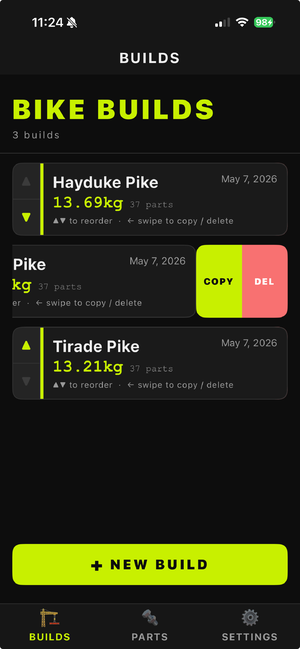
To copy or delete a build, just swipe left.
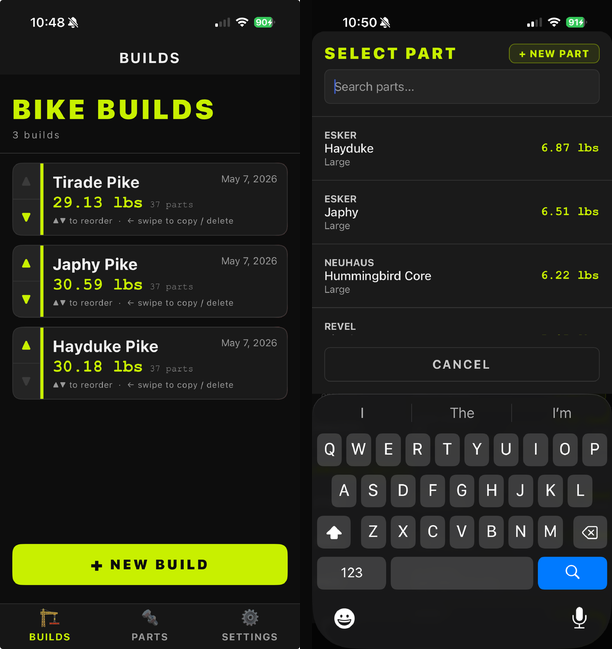
The Builds tab (left) and the guided part picker (right) you'll see while assembling a build.
Logging a Part
Parts can be added through the Parts tab, or while creating a Build. Tap Parts > +. Filter for the category you want to add the part to, add the part and it's weight, and choose grams or pounds - it will default to the units you have selected in Settings.
To delete a part from the inventory, just swipe left.
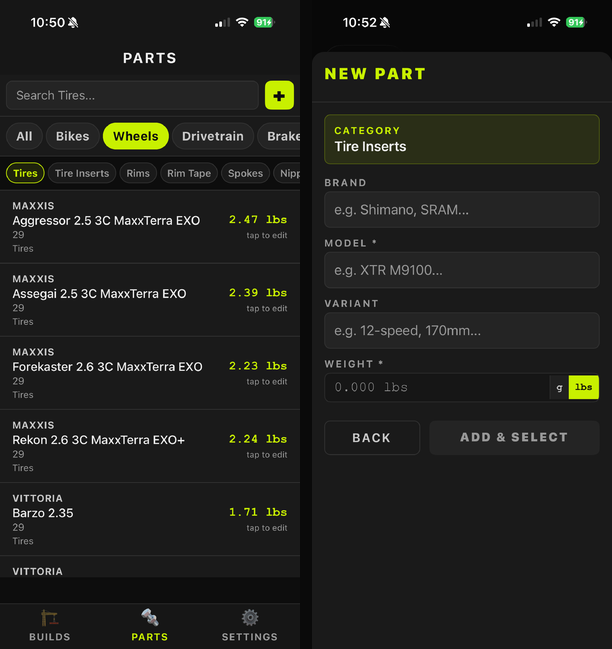
Browsing existing parts (left) and adding a new one with its weight (right).
Viewing Builds
The Builds screen shows all builds, and lets you sort the order. Select a build to edit the which components are a part of that build.
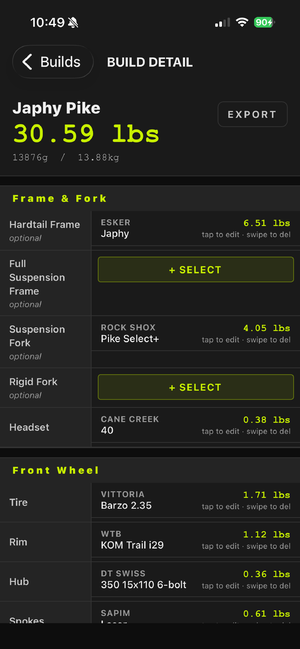
Editing or Deleting Entries
Swipe left on any entry to reveal Delete options. Tap a Part to change any details for that part.
Supporting the Developer
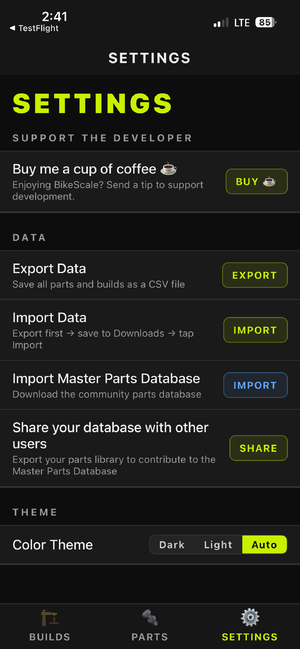
Bike Scale is built and maintained independently. If you're enjoying the app, you can send an optional one-time tip from Settings > Support the Developer > Buy me a cup of coffee ☕. This uses your device's App Store or Play Store account to complete the purchase — it's entirely optional and has no effect on your builds, parts, or app data either way.
From time to time (at most once a week), the app may show a friendly one-time alert suggesting a tip. Tapping Maybe later dismisses it — it won't ask again for at least another week.
3. Frequently Asked Questions
Q: Is my data backed up automatically? The app stores all data locally on your device. It does not back up to any cloud service on its own. Your data is included in your device's local backup if you back up your iPhone via iCloud or iTunes/Finder — this is controlled entirely by your device settings, not the app.
Q: Can I use the app on multiple devices? Currently the app does not sync between devices. Each installation maintains its own local database. If you restore a device backup to a new iPhone, your app data will be restored along with it.
Q: Can I export my data? Yes. Go to Settings > Export Data to generate a CSV file of your entries, which you can save or share via the iOS Share Sheet to email, Files, or any other app.
Q: Does the app require an internet connection? No. The app is fully offline and works without any internet or cellular connection, with one exception: the optional "Buy me a coffee" tip (see below) requires a connection to process the purchase through the App Store or Play Store.
Q: Do I need to create an account? No account is required. The app does not collect any personal information and has no login system.
Q: Can I add more than one bike? Yes, there is no limit to the number of bikes you can add.
Q: What units does the app support? The app supports both US (lbs) and metric (grams) units. You can change the unit system under Settings > Display Unit.
Q: What is the "Buy me a coffee" feature? It's an optional one-time tip you can send to support the app's developer, found under Settings > Support the Developer. It's processed as a standard in-app purchase through the App Store or Play Store and is completely separate from your build/part data — declining or ignoring it doesn't limit any app functionality.
Q: Can I turn off the weekly coffee reminder? There's no permanent opt-out toggle yet. Tapping Maybe later on the alert will dismiss it, and it won't reappear for at least another week.
4. Troubleshooting
The app won't open or crashes on launch
Force-close the app and reopen it (swipe up from the app switcher).
Restart your iPhone.
Check that your iOS version is up to date (Settings > General > Software Update).
Delete and reinstall the app. Note: reinstalling will erase your local data unless you have a device backup.
The app is running slowly
Close other apps running in the background.
Restart your device.
If you have a very large number of entries, performance may improve after archiving older records.
My "Buy me a coffee" purchase didn't go through
Check your internet connection — this is the one feature in the app that requires one.
Confirm you're signed into an App Store / Google Play account capable of making purchases (parental controls or restrictions can block this).
If you were charged but didn't see a confirmation in the app, check your App Store / Play Store purchase history — if the charge is there but something still looks wrong, contact us using the details below.
5. Contact & Support
If you have a question, found a bug, or have a feature suggestion, we'd love to hear from you.
| appinfo@cebaxo.com | |
| Response time | We aim to respond within 2 business days. |
| When contacting us | Please include your iPhone model and iOS version (Settings > General > About) and a description of the issue or question. |
Bike Scale • Support Guide • August 25, 2026 • appinfo@cebaxo.com