
Easy 3D: Add depth to your 2D images
January 8, 2026•420 words
Whether you want to spice up family photos or give AI images another level of realism, I'll show you two straightforward ways to 3D-ize your images. The result will be something like this:

First, pick an image with decent focus and clear boundaries of subjects. Then, you'll use machine-learning/AI tools to generate a depth map to match your image.
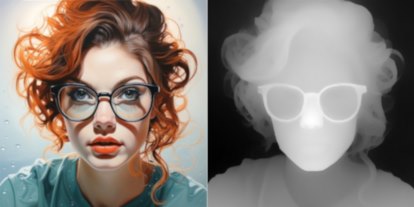
A depth map is a greyscale image where every pixel encodes the depth of pixels in your original image. In other words, the depth map tool makes best guesses about which parts of your image are closer to the camera (shown as lighter/whiter) and which parts are farther away (shown as darker/blacker) and depths in-between.
You could paint your depth map by hand but it is now surprisingly easy to have machine-learning/AI generate this for you.
Creating Depth Images with Depth Anything
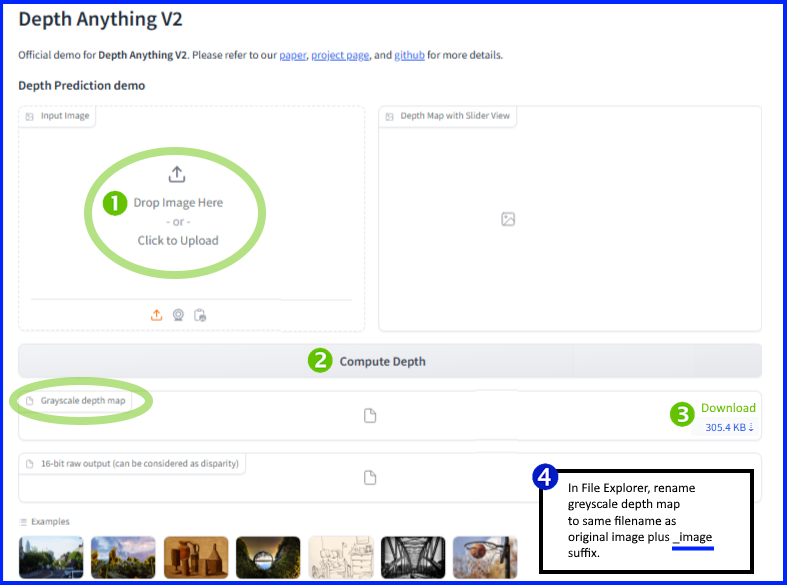
Go to Depth Anything | Hugging Face
- Drop or upload image
- Click [Compute Depth]
- Download the greyscale depth map (ignore the color one)
- In File Explorer, rename your depth map to the same name as your base image plus a _depth suffix. For example, if your base image is xyz.jpg, your depth map might be xyz_depth.png.
Publishing Depth Images to Facebook
This couldn't be easier. Just create a new post and upload both images (above), say xyz.jpg and xyz_depth.png. Facebook will automatically create a depth image that the viewer can interact with to see the 3D effect.
Note: You can't post multiple depth images in one Facebook post, only one at a time.
Official documentation: Create a 3D photo on Faceboook
Viewing your Depth Image on Depthy
You can also display these images on a site called Depthy.
- Upload your base image with [Open Photo]. Depthy will prompt for your depth map image.
- Upload your depth map image.
You can then interact the with the 3D image, have it animate in a left/right/circular loop as well as save an animated GIF or video of your depth image.
Generating a stereo image pair
Finally, you can create stereo image pairs for cross-eyed viewing or viewing in a stereoscope.
No depth map is needed. Just upload your image and download a stereo pair.
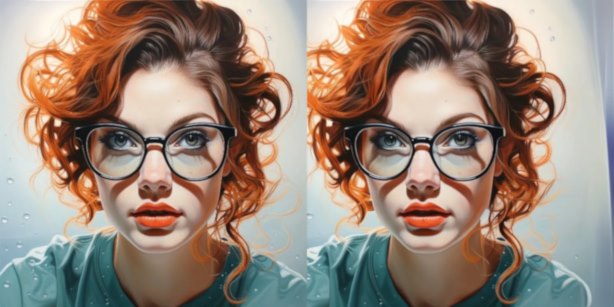
If you unfocus your eyes and try to get the two images to merge in the middle, the image should suddenly pop into 3D.