[CC4057] Lab work – week 5
December 8, 2023•658 words
1. Create a database named tech_academy.
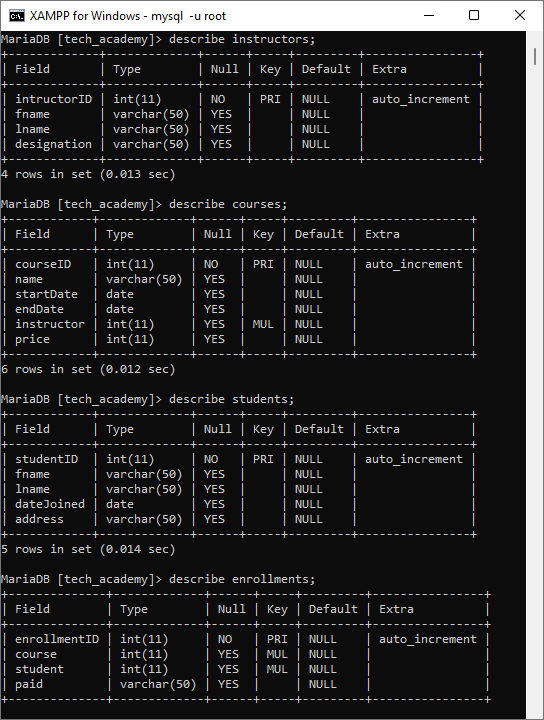
create database tech_academy;
2. Using the dump file tech_academy.sql load the tables and data into the database tech_academy.
mysql -u root tech_academy < tech_academy.sql
3.
create table instructors (
intructorID int primary key auto_increment,
fname varchar(50),
lname varchar(50),
designation varchar(50)
);
create table courses(
courseID int primary key auto_increment,
name varchar(50),
startDate date,
endDate date,
instructor int,
price int,
foreign key(instructor) references instructors(intructorID)
);
create table students(
studentID int primary key auto_increment,
fname varchar(50),
lname varchar(50),
dateJoined date,
address varchar(50)
);
4. Create a table named enrollments with the following structure
create table enrollments(
enrollmentID int primary key auto_increment,
course int,
student int,
paid varchar(50),
foreign key(course) references courses(courseID),
foreign key(student) references students(studentID)
);
5. Insert the following data into the enrollments table
insert into instructors
(fname, lname, designation)
values
("John","Doe","bla");
insert into courses
(name, startDate, endDate, instructor, price)
values
("c1","2020-02-02","2023-12-25",1,50000),
("c2","2019-06-22","2023-01-25",1,45000),
("c3","2020-05-04","2024-12-25",1,35000),
("c4","2022-04-05","2026-04-25",1,56000),
("c5","2016-08-25","2020-11-25",1,65000),
("c6","2020-01-02","2023-04-25",1,115000);
insert into students
(fname , lname , dateJoined , address )
values
("f1","l1","2020-02-02","Lalitpur"),
("f2","l2","2019-06-22","Kathmandu"),
("f3","l3","2020-05-04","Pokhara"),
("f4","l4","2022-04-05","Butwal"),
("f5","l5","2023-12-25","Lamjung"),
("f6","l6","2016-08-25","Biratnagar"),
("f7","l7","2020-01-02","Chitwan"),
("f8","l8","2023-12-25","Pokhara");
insert into enrollments
values
(1,1,1,"yes"),
(2,1,2,"no"),
(3,1,3,"yes"),
(4,2,4,"yes"),
(5,2,5,"yes"),
(6,2,6,"yes"),
(7,3,1,"no"),
(8,3,2,"yes"),
(9,3,7,"no"),
(10,4,4,"yes"),
(11,4,3,"yes"),
(12,4,8,"no"),
(13,5,1,"yes"),
(14,5,2,"no"),
(15,5,4,"yes"),
(16,6,7,"no"),
(17,6,8,"yes"),
(18,6,4,"no");
6. Write SQL statements for doing the following:
a. List the first name, last name and the address of the students sorted according to their addresses
select fname, lname, address from students order by address;
b. List the first name, last name and designation of the instructors sorted according to their last names in descending order
select fname, lname, designation from instructors order by lname desc;
c. List the details of the most expensive course.
select * from courses order by price desc limit 1;
d. Show all the unique addresses of the students
select distinct(address) from students;
e. Show the average price of the courses offered.
select avg(price) as average_price from courses;
f. Show all the details of the students who joined in 2016.
select * from students where year(dateJoined)=2016;
g. Show the first names and address of the students who are from London
select fname, address from students where address="London";
h. Show the details of the students whose first names begin with “A” or “J”.
select * from students where fname like "A%" or fname like "J%";
i. Show the details of the instructors whose first names contain the letter “d” inside them.
select * from instructors where fname like "%d%";
j. Show the details of the courses whose price range is between 200 and 400.
select * from courses where price between 200 and 400;
k. Show the name, startdate and price of the courses which are about to start in april or may.
select name, startDate, price from courses where month(startDate) in (4,5);
l. List the courses and the number of students enrolled in them from the enrollments table.
select course, count(student) from enrollments group by course;
OR
select courses.name, count(enrollments.student) from enrollments join courses on enrollments.course=courses.courseID group by courses.name;
m. List the students and the number of courses they have enrolled in from the enrollments table.
select student, count(course) from enrollments group by student;
n. List the instructors and the number of courses they teach from the courses table.
select instructor, count(courseID) from courses group by instructor;
o. Join the tables courses and instructors using a suitable column.
select * from courses join instructors on instructors.intructorID=courses.instructor;
p. Join the tables enrollments and students using a suitable column.
select * from enrollments join students on enrollments.student=students.studentID;
q. Join the tables enrollments and courses using a suitable column.
select * from enrollments join courses on enrollments.course=courses.courseID;
7. Backup the database creating a dump file named tech_academy2.sql
mysqldump -u root tech_academy > tech_academy2.sql
Screeshot