Gitops with ArgoCD
April 5, 2026•781 words
✅ Scalability – Works across multiple environments and clusters.
✅ Security & Separation – Different GitOps repos/branches for controlled releases.
✅ Fully Automated GitOps – ArgoCD ensures the desired state is always maintained.
✅ Centralized Management – One repo for all environments.
✅ Clear Separation – Each environment has its own directory.
✅ Scalability – Works across multiple clusters and environments.
✅ ArgoCD Flexibility – Can sync specific directories using path: filters.
Overview
This document outlines a self-service GitOps workflow using Azure DevOps and ArgoCD to manage deployments across multiple environments (Dev, Staging, and Production) using a single GitOps repository for manifest storage.
Architecture Overview
Single GitOps Repository for All Environments
All Kubernetes manifests are stored in a single Git repository with separate directories for each environment:
gitops-repo/
├── dev/
│ ├── app1.yaml
│ ├── app2.yaml
├── staging/
│ ├── app1.yaml
│ ├── app2.yaml
├── prod/
│ ├── app1.yaml
│ ├── app2.yaml
Ensures a centralized management approach while maintaining clear separation between environments.
Azure DevOps Pipeline for CI/CD Automation
Developers commit code to the application repository.
The repository includes a .ci folder that references pipeline templates stored in a separate Pipeline Template Repository.
The pipeline:
Builds & pushes container images to an Azure Container Registry.
Updates the appropriate environment's manifest files in the GitOps repository.
ArgoCD for Multi-Cluster Deployments
Each environment (Dev, Staging, Prod) has a dedicated ArgoCD instance that watches the GitOps repository.
ArgoCD filters and syncs only the manifests relevant to its environment:
ArgoCD Dev → gitops-repo/dev/
ArgoCD Staging → gitops-repo/staging/
ArgoCD Prod → gitops-repo/prod/
Multi-cluster support ensures that each environment is deployed to its respective Kubernetes cluster.
Deployment Workflow
- Developer Workflow
Developers commit application code to the application repository.
They modify Kubernetes manifests in the GitOps repo if required.
The commit triggers an Azure DevOps pipeline.
- Azure DevOps CI/CD Pipeline
The pipeline uses templates from the Pipeline Template Repository.
Builds and pushes the Docker image to a container registry.
Updates the Kubernetes manifest files in the appropriate GitOps repo directory.
- ArgoCD Sync and Deployment
ArgoCD instances automatically detect manifest changes in the GitOps repo.
Deployments are applied to the respective Kubernetes clusters based on environment.
Staging and Production deployments require approval before syncing changes.
Advantages of This Model
✅ Centralized GitOps Management – Single repository for all environments.
✅ Clear Environment Separation – Manifests for Dev, Staging, and Prod are organized in separate directories.
✅ Scalable Multi-Cluster Deployment – Each ArgoCD instance deploys only relevant changes.
✅ Flexible and Secure – Staging and Prod require manual approvals before deployment.
✅ Automated CI/CD with Azure DevOps – Reduces manual intervention and ensures consistency.
Potential Enhancements
🔹 Progressive Delivery Strategies – Implement Canary Deployments or Blue-Green Releases with Argo Rollouts
🔹 RBAC and Security Controls – Restrict who can modify manifests per environment.
ArgoCD Auditability and PCI Compliance
To meet PCI DSS (Payment Card Industry Data Security Standard) compliance, the following auditability and security measures should be enforced in ArgoCD:
- Access Control & Authentication
Implement RBAC (Role-Based Access Control) to restrict ArgoCD access based on roles.
Integrate SSO (Single Sign-On) using LDAP, OIDC, or Active Directory for centralized authentication.
Enable Multi-Factor Authentication (MFA) for all administrative users.
- Audit Logging & Monitoring
Enable ArgoCD audit logging to track deployments, changes, and access.
Store logs securely using SIEM solutions like ELK, Splunk, or Azure Monitor.
Monitor ArgoCD activity using Prometheus & Grafana dashboards.
Maintain logs for at least 12 months to meet PCI audit requirements.
- Change Management & Approval Processes
Require peer review and approval for GitOps repository changes before deployment.
Enforce protected branches & pull requests (PRs) for manifest modifications.
Enable manual approval gates in ArgoCD for production deployments.
- Secure Configuration & Secrets Management
Use Sealed Secrets or Vault (e.g., HashiCorp Vault, Azure Key Vault) to store sensitive credentials.
Ensure that ArgoCD ConfigMaps & Secrets are encrypted and stored securely.
Disable direct cluster access from ArgoCD unless necessary.
- Network Security & Cluster Isolation
Restrict ArgoCD API access to only approved IP ranges.
Implement network policies to limit pod-to-pod communication.
Use TLS encryption for all ArgoCD communications.
- Compliance Reporting & Incident Response
Generate automated compliance reports for audit purposes.
Implement alerting & notification mechanisms for unauthorized changes.
Conduct regular security reviews & vulnerability assessments on ArgoCD and CI/CD pipelines.
This architecture ensures a scalable, automated, and self-service GitOps workflow, enabling teams to deploy applications efficiently across multiple environments and clusters.
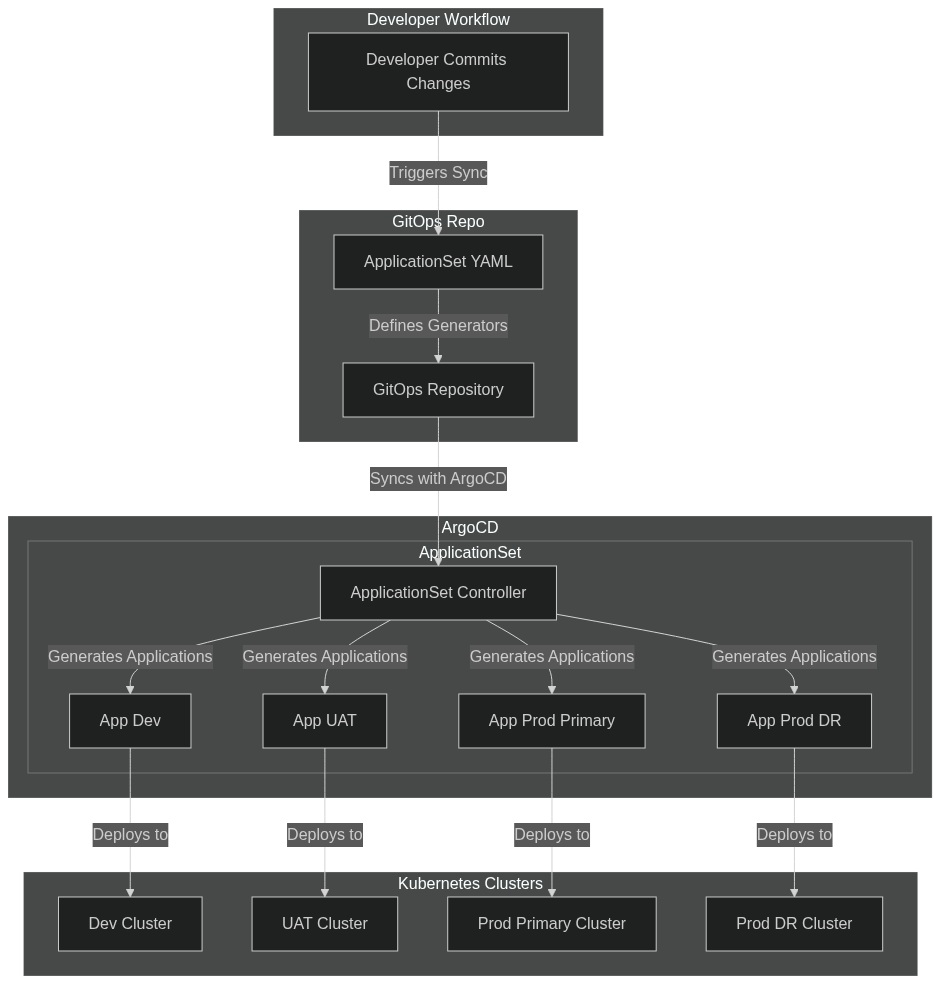
ArogCD Application Set
The ApplicationSet controller adds Application automation and seeks to improve multi-cluster support and cluster multitenant support within Argo CD. Argo CD Applications may be templated from multiple different sources, including from Git or Argo CD's own defined cluster list.