
2026年7月2日星期四 at 17:20
July 2, 2026•1,465 words
How to Create Custom D&D Tokens and Miniatures with Token Maker
In this tutorial, I'll show you how to create professional-quality character tokens and miniatures for your tabletop RPG sessions — no artistic skills required, and it's completely free.
If you're a Dungeons & Dragons fan like me, you know the struggle. You've got an epic campaign planned, your character backstory is Shakespearean-level drama, but when it comes to representing your hero on the battle map... you're stuck with a plain glass bead or a hastily drawn circle.
That ends today. Let me introduce you to Token Maker.
Check it out at Token Maker.
It's a free online tool specifically designed for tabletop RPG players and game masters. You can turn any character portrait into a beautiful circular token with a custom border, perfect for virtual tabletop platforms like Roll20, Foundry VTT, or even for printing and using as physical miniatures.
I discovered it while prepping for my weekly D&D session, and it's completely changed how I run combat encounters. My players actually want to see their tokens on the map now.
Let me walk you through how to use it.
What You Can Create with Token Maker
Before we dive in, here's what this tool can do:
- Character Tokens — Circular portraits with decorative borders for any RPG system
- Monster Tokens — Quickly whip up enemy tokens for encounters
- NPC Tokens — Give your shopkeepers and quest-givers some visual personality
- Printable Miniatures — Export at high resolution for physical tabletop use
- VTT-Ready Assets — Perfect size and format for Roll20, Foundry, Fantasy Grounds, and more
Materials You'll Need (For Physical Tokens)
Cardstock or Photo Paper — For printing your tokens. I recommend glossy photo paper for the best color pop.
Scissors or Craft Knife — For cutting out your printed tokens.
1-inch Circle Punch (Optional) — Makes cutting perfect circles effortless. Highly recommended if you plan to make a lot of tokens.
Glue or Mod Podge — For attaching printed tokens to bases.
Token Bases — You can buy 1-inch wooden discs online, reuse old board game pieces, or even use bottle caps.
Laminator (Optional) — For extra durability, especially for tokens you'll handle frequently.
Step 1: Choose Your Character Portrait
The foundation of a great token is a great image. Here are my go-to sources:
- AI Image Generators — Midjourney, DALL-E, or Stable Diffusion for unique custom characters
- Portrait Generators — Hero Forge, Artbreeder, or Picrew for consistent character art
- Stock Art — Search for fantasy portraits on free stock sites (make sure you have usage rights)
- Commissioned Art — If you have custom character art from an artist, this is the perfect use for it
Pro tip: Square images work best. The tool will automatically crop to a circle, so make sure your character's face is centered.
Step 2: Upload to Token Maker
Go to Token Maker — the interface is clean and intuitive.
- Click the upload area and select your character portrait.
- The tool instantly generates a circular token preview.
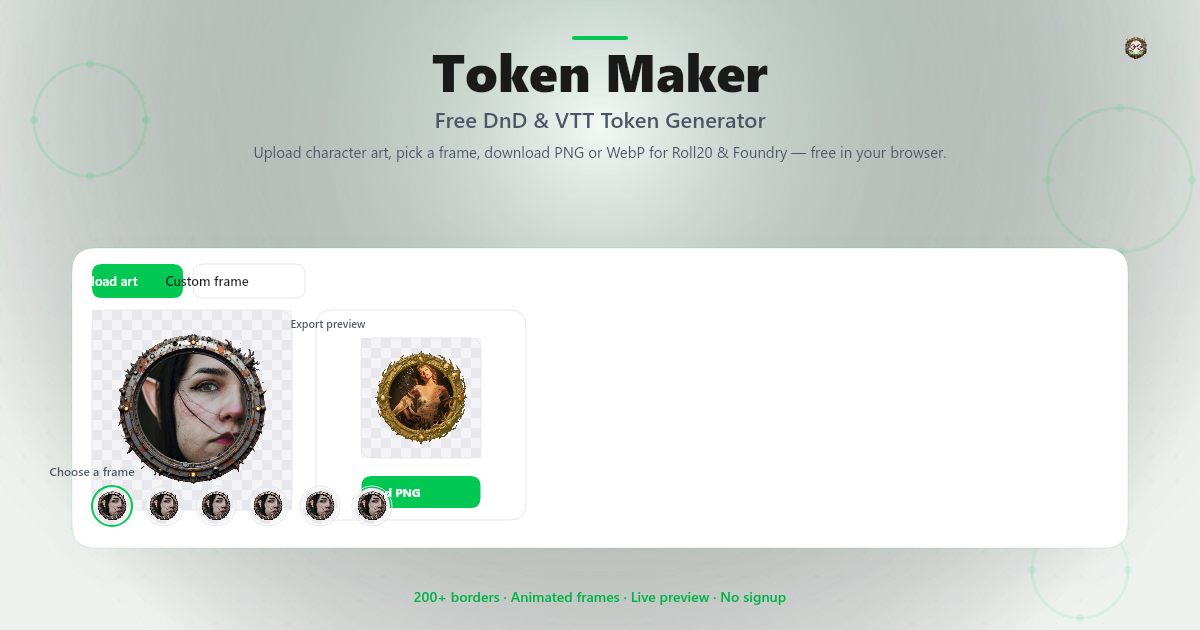
You can customize several settings to match your character's vibe:
- Border Style — Choose from classic, ornate, simple line, or decorative frames. Fighters look great with bold borders, while rogues suit sleek minimal frames.
- Border Color — Match your character's class or personality. I use gold for paladins, silver for clerics, and dark red for warlocks.
- Inner Ring — Add a secondary colored ring for extra detail. Great for indicating status effects or party roles.
- Background Removal — The tool can automatically remove busy backgrounds so your character pops.
Step 3: Download Your Token
Once you're happy with the design:
- Click Download to save your token.
- Choose your resolution:
- VTT Use — 280x280px is perfect for Roll20 and most virtual tabletops
- Print Use — 600x600px or higher for crisp physical tokens
The downloaded file is a PNG with transparency, so it works seamlessly on any virtual tabletop platform.
Step 4: Using Tokens in Virtual Tabletop (VTT)
For online campaigns, using your custom tokens is effortless:
Roll20:
- Upload the PNG to your Roll20 library
- Drag it onto the map
- Right-click → "Edit" → "Set Token" to assign it to a character sheet
Foundry VTT:
- Create a new Actor
- In the Prototype Token settings, upload your image
- The circular format with transparent background blends perfectly with Foundry's grid
Fantasy Grounds:
- Import the image as a token in the Assets library
- Assign to your character in the Character Sheet
Step 5: Making Physical Tokens (Optional)
For in-person sessions, printed tokens add a tactile element that players love.
My printing process:
- Open a document in Word, Google Docs, or any image editor
- Arrange multiple tokens in a grid (I fit 20 per page)
- Print on glossy photo paper or cardstock
- Cut out with scissors or a 1-inch circle punch
- Glue to wooden discs or token bases
- Optional: Laminate for durability
Pro tip: Print a batch of "blank" tokens with just borders in different colors. You can write names on them with dry-erase markers for one-shot NPCs or temporary enemies.
Advanced Tips for Game Masters
Running a campaign? Here's how to level up your token game:
Color-Code Your Encounters
Use border colors to indicate enemy types:
- Red borders — Hostile creatures
- Yellow borders — Neutral NPCs
- Green borders — Friendly allies
- Purple borders — Boss enemies
Status Effect Rings
Use the inner ring feature to show conditions:
- Blue inner ring — Frozen/Charmed
- Orange inner ring — Burning
- Gray inner ring — Unconscious/Dead
Your players will thank you for the visual clarity.
Monster Token Library
Build a reusable library of common monsters:
- Goblins, skeletons, wolves, bandits
- Save them in folders by challenge rating
- Reuse across multiple campaigns
Token Maker vs Token Stamp
You might have heard of Token Stamp — another popular tool in the RPG community. Here's how they compare:
| Feature | Token Maker | Token Stamp |
|---|---|---|
| Ease of Use | Drag and drop, instant preview | Simple interface, quick results |
| Border Styles | Multiple ornate and themed frames | Classic clean borders |
| Customization | Color, inner ring, background removal | Basic border and color options |
| Export Resolution | High-res for print and VTT | Standard VTT sizes |
| Best For | Players who want detailed character tokens | Quick one-off tokens |
Both tools are excellent, and many DMs use both depending on the project. I personally use Token Maker for my player characters and recurring NPCs because the border variety really helps each character feel unique. For random encounter monsters, Token Stamp works great too.
Troubleshooting Tips
| Problem | Solution |
|---|---|
| Image looks blurry in VTT | Download at higher resolution (600x600px+) |
| Background not fully removed | Use a dedicated background removal tool first, then upload |
| Border doesn't match character vibe | Try different border styles — ornate for nobles, simple for commoners |
| Printed tokens look faded | Check your printer settings — use "High Quality" or "Photo" mode |
| Can't find the right portrait | Try AI art generators with prompts like "D&D dwarf fighter portrait" |
Why I Prefer Token Maker
I've tried several token creation tools, and here's why Token Maker is my go-to:
- Designed for RPGs — Borders and styles actually fit fantasy/sci-fi aesthetics
- No signup required — Just upload and create
- Free to use — No paywalls for basic features
- High-res exports — Crisp tokens for both digital and print
- Fast processing — No waiting, instant results
- Works on mobile — Prep tokens on your phone during commute
Whether you're a player who wants their character to look epic, or a DM building a visual encounter library, this tool saves hours of work.
Ready to Upgrade Your Tabletop?
Head over to Token Maker and create your first token. Your next D&D session will look more polished than ever.
Have you made custom tokens for your campaign? I'd love to hear what you created! Drop your character stories or token tips in the comments below.
Related Guides You Might Enjoy:
- How to Build a Digital DM Screen in Roll20
- 10 Free Tools Every Dungeon Master Should Know
- How to Run Combat Faster in D&D 5e
May your rolls be natural 20s!